
WhatsApp broadcast for business: how to send it, the limits, and 20 example messages
A WhatsApp broadcast sends one message to many contacts at once, and each person receives it as a private chat from you. In the free broadcast list, a list holds up to 256 contacts and only people who saved your number receive it. In 2026 WhatsApp is also rolling out paid business broadcasts in the Business app. Below: setup, limits, and 20 messages for a store.
By Mousa Alhelo, founder, E-SAFQA · Updated · 9 min read · How we write and test these guides

Broadcast list, group, community, channel: which one sends what
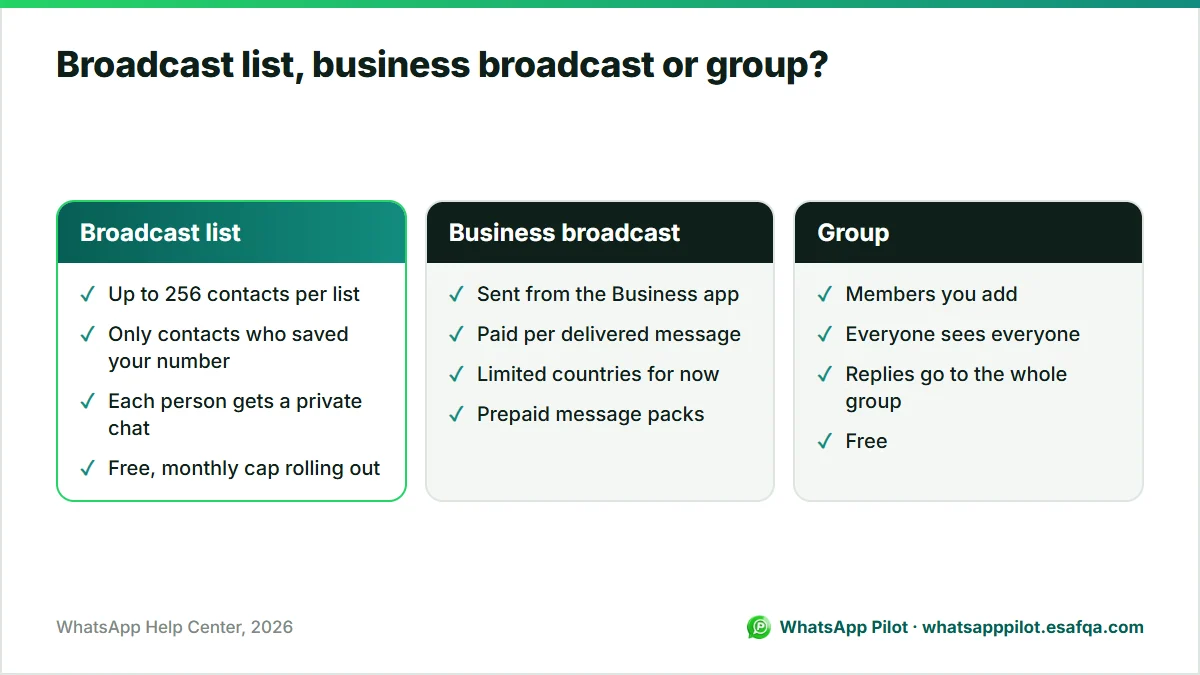
WhatsApp has five ways to reach many people, and they behave very differently. A store usually wants a broadcast list or a business broadcast, because replies come back to you privately and customers never see each other's numbers.
| Tool | Who receives it | Can recipients see each other? | Cost |
|---|---|---|---|
| Broadcast list | Up to 256 contacts per list who saved your number | No, each gets a private chat | Free (a monthly cap is rolling out) |
| Business broadcast (Business app) | Customers you choose in the Business app | No | Paid per delivered message, limited countries |
| Group | Members you add | Yes, everyone sees everyone | Free |
| Community | Several groups under one announcement group | Yes, within groups | Free |
| Channel | Anyone who follows it | No, one-way updates | Free |
How to send a broadcast message on WhatsApp
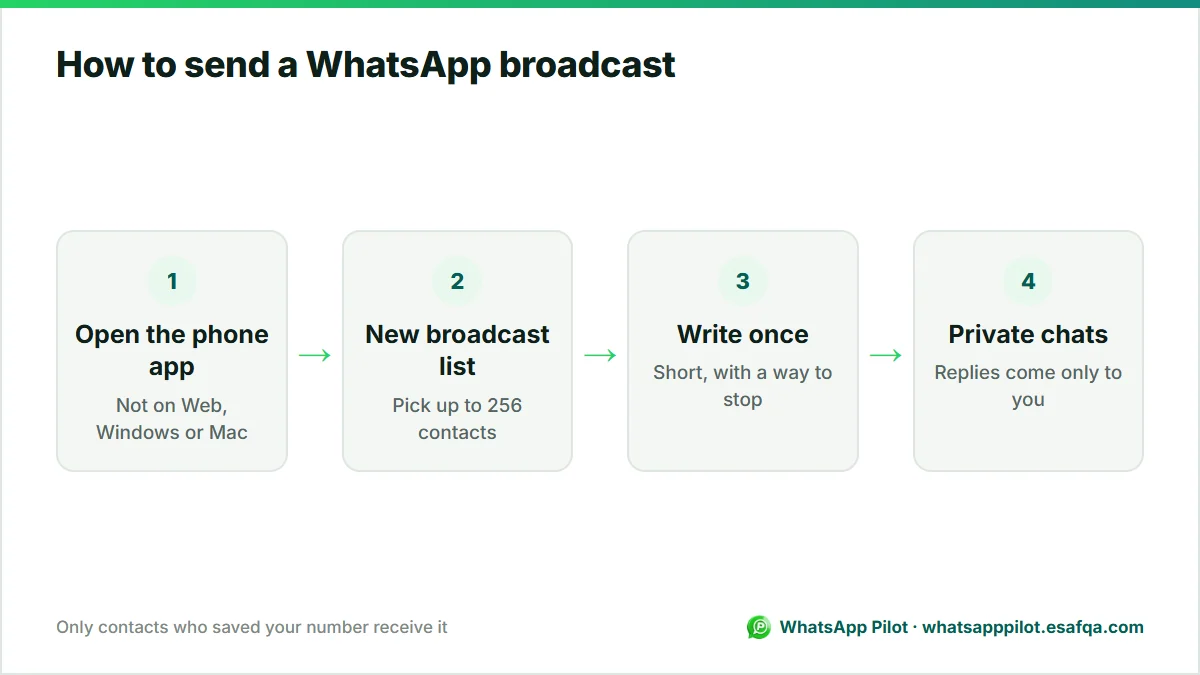
Broadcast lists are created on the phone. WhatsApp says they are not supported on WhatsApp Web, Windows or Mac, so build them in the app on your phone.
- Android: open WhatsApp, tap the three dots (More) on the Chats tab and choose Broadcast lists (older versions: New broadcast).
- iPhone: open Settings or tap your profile picture, then Broadcast messages and New list.
- Search for and select the contacts you want, then tap the check mark (Android) or Create (iPhone).
- Write the message once and send it. Each contact receives it as a normal one-to-one chat from you.
- Replies arrive in your normal chats, never in front of the other recipients.
- To edit a list later, open it and tap List info to rename it or add and remove recipients.
The limits that matter for a store in 2026
- 256 contacts per broadcast list. You can create several lists, but each list is capped.
- Saved number rule: a contact only receives your broadcast if they have saved your number in their phone. This is the main reason broadcasts reach fewer people than expected.
- Monthly cap: WhatsApp's help page says a monthly limit on broadcast messages is rolling out gradually and may not apply to you yet. Tech press has reported figures in the tens of messages per month for the free tier in tested regions; check the broadcast screen in your own app for your current allowance.
- Paid business broadcasts: in the WhatsApp Business app, WhatsApp now sells business broadcasts for a fee in limited countries. You pay per message delivered within five days, priced by the recipient's country code, or with prepaid message packs whose credits do not expire.
- No sending from a computer: broadcast lists live on the phone app only.
20 example WhatsApp broadcast messages for an online store
Each example is short, says who you are, gives one reason to act, and ends with an easy way to stop. Replace the words in braces. Send only to customers who agreed to hear from you.
- New arrivals: Hi {name}, it's {store}. The autumn collection is live today, 24 new pieces. Have a look: {link}. Reply STOP if you'd rather not get updates.
- New arrivals: Fresh in this week at {store}: {product} in three new colours. See them here: {link}
- Back in stock: Good news, {product} is back in stock in all sizes. It sold out in 4 days last time: {link}
- Back in stock: You asked about {product}. It's back today, and we've set one aside until 8 pm if you want it. Just reply YES.
- Sale: Our weekend sale starts now: 20% off everything with code WEEKEND20 until Sunday midnight. {link}
- Sale: Last 24 hours of the sale. Prices go back to normal tomorrow at 9 am: {link}
- Free shipping: Free shipping on every order this week, no minimum. Shop here: {link}
- Bundle: Buy any two {category} items and get the third free. Mix and match: {link}
- Seasonal: Ramadan Kareem from all of us at {store}. Our Eid gift guide is ready, with delivery before Eid on orders placed by {date}: {link}
- Seasonal: Black Friday early access for our WhatsApp list only: 30% off starts tonight at 8 pm, one day before everyone else.
- Gift: Need a gift? Reply with your budget and we'll suggest three ideas from our shop.
- Restock heads-up: {product} is coming back on {date}. Reply NOTIFY and we'll message you the moment it's live.
- Event: We're at the {city} market on Saturday, stand 14, 10 am to 6 pm. Show this message for a free gift with any purchase.
- Loyalty: Thank you for being one of our first 100 customers. Here's 15% off your next order, just for you: THANKS15
- Tip: How to wash {product} so it lasts years: cold water, inside out, air dry. More care tips: {link}
- Survey: Quick question: which colour should we make next, green or navy? Reply 1 or 2.
- Price drop: {product} is now {price}, down from {old price}, while stock lasts: {link}
- Pre-order: Pre-orders for {product} open tomorrow at 10 am. Pre-order customers get it first and pay no shipping.
- Store news: We've moved to faster delivery: orders before 2 pm now ship the same day in {city}.
- Re-engagement: It's been a while, {name}. Here's what's new at {store} this month: {link}. Not interested anymore? Reply STOP and we'll remove you.
Rules that keep your number safe
- Only message people who opted in. A customer who bought once has not agreed to promotions. Ask at checkout or in chat, and record it.
- Say who you are in the first line. Recipients see a chat from a number; your store name stops it looking like spam.
- Give a way out in every promotional broadcast, such as Reply STOP, and honour it the same day.
- Keep a steady, modest rhythm. One or two promotional broadcasts a week is plenty for most stores; blocks and reports hurt your number.
- Personalise where you can. A broadcast with the customer's name and a product they looked at gets far fewer blocks than a generic blast.
When a broadcast is the wrong tool
Broadcasts are for one-to-many news. Messages that belong to one order or one customer work better as automations that fire on their own: an order confirmation when the order is placed, a shipping notice when Shopify fulfils it, a reminder when a checkout is abandoned, or an alert when the exact variant a shopper asked for is back in stock.
That is what WhatsApp Pilot does for Shopify stores, from your own WhatsApp number. It does not send bulk broadcasts. If you need large promotional campaigns to thousands of customers, use paid business broadcasts or the WhatsApp Business Platform (API) with marketing templates.
Frequently asked questions
How many people can I send a WhatsApp broadcast to?
Up to 256 contacts per broadcast list. You can create several lists. A monthly cap on broadcast messages is rolling out gradually, and paid business broadcasts in the Business app are not limited to 256.
Why didn't some contacts receive my broadcast?
A contact only receives a broadcast-list message if they saved your number in their phone. Ask customers to save it, for example in your order confirmation.
Can I send a WhatsApp broadcast from my computer?
No. WhatsApp says broadcast lists are not supported on WhatsApp Web, Windows or Mac. Create and send them from the phone app.
Are WhatsApp broadcasts free?
Broadcast lists are free but a monthly limit is rolling out. Business broadcasts in the WhatsApp Business app are paid per delivered message in the countries where they are available.
Do recipients know a message was a broadcast?
They see it as a normal private message from you. Their reply goes only to you, not to the rest of the list.
Ready to put WhatsApp to work on your store?
Start with the free widget. Upgrade to Pro for order messages, cart recovery, the smart product button, back-in-stock alerts and Product Demand.